
Filter Operation Use Cases
In this guide, we will be discussing various scenarios in which Filter operation can be used and how the users can add them to their integration bridge.
To show these scenarios, a dataset of 12 records has been used in multiple ways. The dataset consists of records:

Scenario 1: With Target as Datalake and 1 filter condition
In this scenario, one filter condition will be applied on the data coming from the source and then the filtered record will be sent to datalake.

Operations Used:
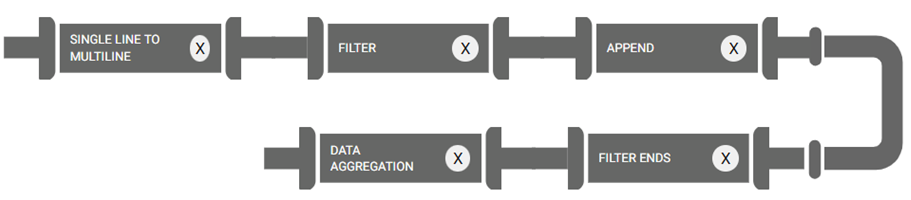
To send the records to datalake, we apply Singleline to Multiline operation as the data coming from source is a singleline JSON data. Next, the filter condition is applied as per the requirement (Here, Filter condition applied is ID not equal to 2, which means records associated with ID 2 should not be sent to target). Once the filter operation is applied, create a new column using Append, which will help represent the status of the records sent, end the filter condition using Filter Ends, and aggregate the data using Data Aggregation for sending to the Target.
Example: Data in Source
{
  "id": 1,
  "email": "george.bluth@reqres.in",
  "first_name": "George",
  "last_name": "Bluth"
},
{
  "id": 2,
  "email": "janet.weaver@reqres.in",
  "first_name": "Janet",
  "last_name": "Weaver"
},
{
  "id": 3,
  "email": "emma.wong@reqres.in",
  "first_name": "Emma",
  "last_name": "Wong"
}
Filter Condition:
data['id'] !=2Output in Datalake:
|
id |
|
first_name |
last_name |
Status |
|
1 |
george.bluth@reqres.in |
George |
Bluth |
Success |
|
3 |
emma.wong@reqres.in |
Emma |
Wong |
Success |